How to Rebuild A Website Without Losing What Is Already Working
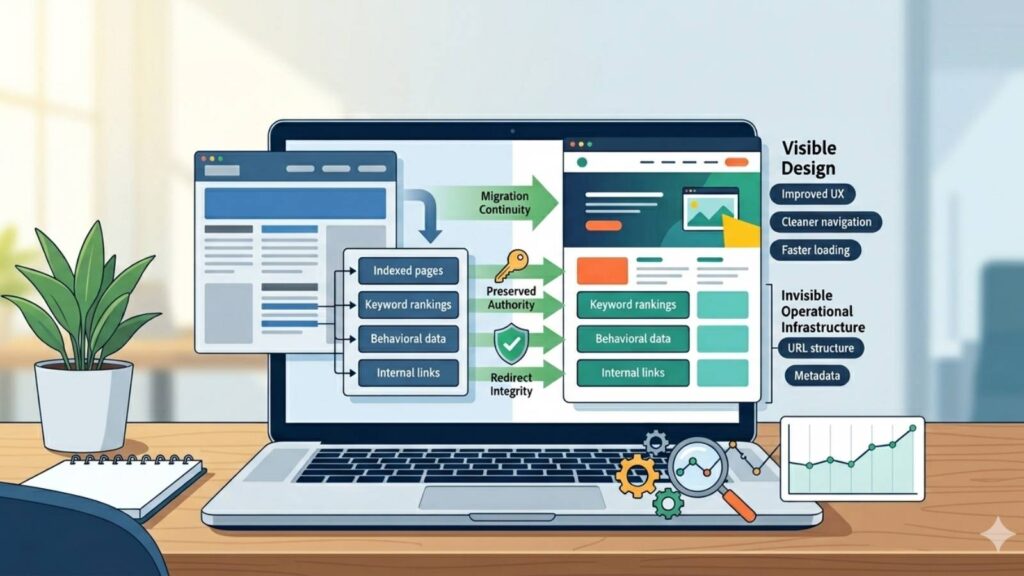
Most attempts to rebuild a website fail quietly. The new design launches. It looks cleaner. Modern. More polished. But a few weeks later, rankings start dropping. Organic traffic declines. Leads slow down. Pages disappear from search results. Conversion rates weaken. Sometimes businesses cannot even explain what broke. That happens because many redesigns focus on appearance while ignoring infrastructure. A website is not just visuals anymore. It is accumulated trust. Search authority. Behavioral data. User familiarity. Indexed structure. Internal linking systems. Conversion pathways. When businesses rebuild websites carelessly, they often destroy invisible systems that took years to build. According to Google Search Central documentation on site moves and URL changes, major website changes can significantly affect search visibility if migrations are not handled properly. Search engines rely on continuity, structure, redirects, and crawlable relationships to preserve ranking signals during transitions.
This creates a major misconception: People think redesigning a website means replacing the old one completely. In reality, strong redesigns protect what already works while improving what does not. How do you rebuild a website without losing SEO, traffic, and conversions? You rebuild a website safely by preserving high-performing pages, maintaining URL structures where possible, protecting technical SEO systems, using proper redirects, analyzing existing performance data, and improving user experience without destroying search authority or trust signals. At Marginseye Digital, we have seen businesses lose years of accumulated visibility simply because they treated redesigns like visual resets instead of operational migrations.The internet remembers structure. Even when businesses forget it. This guide is reviewed and updated quarterly.
Last verified: May 8, 2026 Next update scheduled: August 8, 2026
Key Takeaways
- Website redesigns can damage rankings if SEO infrastructure is ignored.
- High-performing pages should be protected during rebuilds.
- URL changes without proper redirects often destroy search visibility.
- User behavior data reveals what should not be removed.
- A website rebuild is a migration process, not just a design project.
- The best redesigns improve systems without resetting authority.
What Problems Happen When You Want To Rebuild a Website?
The biggest mistake businesses make during redesigns is assuming everything old is bad. That assumption destroys continuity. Many websites already contain valuable systems:
- Indexed pages
- Backlinks
- Keyword rankings
- User trust signals
- Conversion pathways
- Internal linking structures
- Search authority
When redesigns ignore these systems, businesses accidentally remove the very things driving visibility. According to HubSpot website redesign research, poorly managed redesigns often cause traffic drops because businesses fail to preserve SEO equity properly during migrations. Another major issue is URL restructuring.
Businesses frequently:
- Rename URLs unnecessarily
- Delete indexed pages
- Break internal links
- Remove content without redirects
Search engines interpret these disruptions as structural instability. Additionally, redesigns often prioritize aesthetics over usability. Heavy animations, oversized visuals, bloated frameworks, and unnecessary scripts frequently reduce:
- Site speed
- Mobile usability
- Accessibility
- Conversion efficiency
The irony is common: A “better-looking” website sometimes performs worse operationally. Another hidden issue is abandoning historical data. Many businesses redesign websites without analyzing:
- Top-performing pages
- Most-converting pages
- Strongest backlinks
- Highest engagement paths
That means decisions are made emotionally instead of structurally.
How to Rebuild A Website Without Losing Performance
The first step is understanding what is already working. Before changing anything, audit:
- Organic traffic
- Conversion data
- Backlink profiles
- Top-ranking pages
- User behavior flows
- Technical SEO health
You cannot preserve systems you have not identified. Next, categorize pages into:
- Keep
- Improve
- Merge
- Redirect
- Remove carefully
This creates controlled migration logic. One of the safest approaches is preserving existing URL structures wherever possible. When URLs must change, proper 301 redirects become essential because they help transfer authority and preserve search continuity.
Additionally, preserve strong-performing content.
Many redesigns delete pages simply because they “look old,” even when those pages rank well or convert effectively.
The smarter approach is modernization without authority destruction.
Another critical step is maintaining internal linking systems. Internal links help search engines understand:
- Page relationships
- Content hierarchy
- Topic authority
- Crawl pathways
Breaking those systems weakens discoverability. Technical stability also matters heavily during redesigns.
That includes:
- Mobile responsiveness
- Site speed
- Metadata preservation
- Schema markup
- Crawlability
- Canonical tags
Search visibility depends on structural consistency more than businesses realize.
Need a website that makes a strong first impression? Let’s create a design that feels modern, fast, and effective
Marginseye Digital Expert Insight
At Marginseye Digital, we often see businesses approach redesigns emotionally instead of analytically. They want the website to “feel fresh.” That is understandable. But websites are not only branding assets anymore. They are accumulated operational systems tied to discoverability, trust, and conversion behavior.
The strongest rebuilds preserve authority while improving clarity. Most redesign failures happen because teams optimize what users see while accidentally damaging what search systems rely on underneath.
Good redesign strategy protects invisible infrastructure first.
What Are the Benefits of Rebuilding a Website Properly?
A strategic rebuild improves performance without sacrificing existing momentum. That matters because rebuilding from zero is expensive operationally.
When done properly, a website rebuild can:
- Improve user experience
- Increase conversion rates
- Strengthen SEO performance
- Improve mobile usability
- Modernize brand perception
- Improve site speed
- Strengthen technical infrastructure
Additionally, rebuilding strategically allows businesses to remove friction accumulated over time without resetting authority completely. Consequently, businesses often experience:
- Better engagement
- Cleaner navigation
- Improved lead quality
- Higher search visibility
- Stronger trust signals
The key difference is preservation. Strong redesigns evolve systems. Weak redesigns erase them.
Case Studies: Website Rebuilds Done Right
Case Study 1 – Ecommerce Website Preserves Rankings During Redesign
An ecommerce company planned a complete visual redesign. Initially, the team wanted to:
- Delete old category pages
- Rename URLs
- Rebuild navigation entirely
SEO analysis revealed many of those pages already ranked strongly and carried valuable backlinks. Instead of deleting them, the business:
- Preserved high-performing URLs
- Improved content structure
- Optimized mobile usability
- Modernized design gradually
Consequently:
- Rankings remained stable
- Conversion rates improved
- Bounce rates declined
The authority stayed intact because continuity was protected.
Case Study 2 – Service Business Improves UX Without Losing Traffic
A service provider rebuilt their outdated website to improve trust and lead generation. Rather than replacing everything blindly, the business analyzed:
- Top organic landing pages
- Highest-converting pages
- Strong backlink targets
The redesign focused on:
- Faster loading speed
- Cleaner messaging
- Better calls-to-action
- Improved mobile experience
As a result:
- Organic traffic remained stable
- Lead quality improved
- User engagement increased
The structure evolved without damaging discoverability.
How to Rebuild a Website Safely Step by Step
Step 1: Audit Existing Website Performance
Before redesigning anything, analyze:
- Organic traffic
- Ranking pages
- Backlinks
- Conversion data
- Technical SEO
- User behavior
Data reveals what must be protected.
Step 2: Identify High-Value Pages
Protect pages with:
- Strong rankings
- Valuable backlinks
- High engagement
- Conversion performance
These pages already carry authority.
Step 3: Preserve URL Structures When You Rebuild a Website
Changing URLs unnecessarily creates avoidable SEO risk.
If URLs must change:
- Use 301 redirects
- Update internal links
- Test redirect accuracy carefully
Continuity matters heavily.
Step 4: Improve User Experience Strategically
Focus on:
- Clear navigation
- Faster loading
- Better mobile usability
- Cleaner messaging
- Stronger calls-to-action
Good UX reduces friction without damaging structure.
Step 5: Preserve Technical SEO Infrastructure
Ensure:
- Metadata remains intact
- Schema markup survives migration
- Canonical tags work correctly
- XML sitemaps update properly
- Robots.txt is configured correctly
Technical systems protect discoverability.
Step 6: Monitor Post-Launch Performance Closely
After launch, monitor:
- Rankings
- Traffic
- Crawl errors
- Redirect issues
- Conversion performance
- Site speed
Most redesign problems appear after launch.
Early detection reduces damage.
What Should Be Protected During a Website Rebuild?
Website Element | Why It Matters |
High-ranking pages | Preserve search visibility |
Backlinks | Retain authority signals |
URL structures | Maintain continuity |
Metadata | Preserve relevance signals |
Internal links | Protect crawl pathways |
Conversion pages | Maintain lead generation |
Schema markup | Support machine understanding |
Site speed performance | Protect UX and SEO |
The deeper principle is simple: Do not destroy accumulated trust accidentally.
What Are the Pros and Cons of Website Rebuilds?
Pros | Cons |
Improved user experience | SEO risk if mishandled |
Better mobile optimization | Migration complexity |
Faster site performance | Temporary instability possible |
Stronger conversion systems | Technical expertise required |
Modernized brand perception | Higher development costs |
The issue is not whether redesigns are good or bad. The issue is whether continuity is respected.
What Mistakes Should You Avoid During a Website Rebuild?
- Deleting ranking pages carelessly — Existing authority matters.
- Changing URLs unnecessarily — Structure continuity protects SEO.
- Ignoring redirects — Broken paths damage discoverability.
- Focusing only on aesthetics — Visual redesign alone is not strategy.
- Removing useful content — Older pages may still perform strongly.
- Breaking internal linking systems — Search engines rely on relationships between pages.
- Ignoring mobile optimization — Most users browse primarily on mobile devices.
- Launching without testing — Migration errors compound quickly.
The deeper problem is that many redesigns optimize appearance while disrupting operational infrastructure underneath.
Website Rebuild Checklist
Use this redesign safety checklist before launching:
- ☐ Have top-performing pages been identified?
- ☐ Are important URLs preserved?
- ☐ Are 301 redirects configured properly?
- ☐ Is metadata preserved?
- ☐ Has mobile usability been tested?
- ☐ Is internal linking maintained?
- ☐ Has site speed improved?
- ☐ Are rankings and analytics monitored post-launch?
If several answers are “no,” the redesign may introduce unnecessary SEO and conversion risks.
Conclusion
Most website rebuilds fail because businesses misunderstand what websites actually are. They are not just visual assets. They are layered systems built over time:
- Search authority
- User trust
- Behavioral data
- Indexed relationships
- Conversion pathways
Strong redesigns protect those systems while improving usability and clarity. Weak redesigns erase accumulated momentum accidentally. The internet rewards continuity more than businesses realize. Because search engines, users, and recommendation systems all rely on patterns. And rebuilding a website successfully is really about preserving the right patterns while removing the wrong friction.
Next Read >>>>>>> Successful Mobile First Design why Its no longer Optional
Want to Rebuild your Website Successfully?
If you are ready for a website that looks great and works even better?
Let’s help you build a site that turns visitors into customers.
