The best hosting for 100k traffic blogs is not determined by the monthly visitor number alone. A blog with 100,000 monthly visitors may run reliably on well-configured hosting if most pages are cached, while a smaller site with comments, memberships, search, or ecommerce may need more powerful infrastructure.
For accurate hosting decisions, evaluate peak requests, concurrent visitors, cache-hit ratio, database activity, PHP workers, CPU usage, memory, storage performance, and downtime risk.
This guide explains how to scale a high-traffic WordPress blog, when shared hosting becomes risky, and whether managed WordPress hosting, VPS hosting, or cloud hosting is the right next step.
The 100k Visitor Milestone: Why Your Current Hosting is About to Break
A blog receiving 100,000 monthly visitors averages about 3,333 visitors per day. That average can be misleading because traffic is rarely distributed evenly.
A viral article, Google ranking increase, email campaign, social media post, or breaking news event can send thousands of users to the same website within a short period. Your hosting must be designed for peak traffic, not just the monthly average.
Hosting affects whether your website can consistently deliver pages, process database requests, handle visitors at the same time, and recover quickly after an incident. It does not replace good technical SEO, optimized content, or a well-configured WordPress installation.
Google’s Core Web Vitals measure real-world loading performance, interactivity, and visual stability. Hosting is only one performance factor, but overloaded infrastructure can contribute to slow server response times and an unstable user experience.
The Anatomy of a Crash: What Happens to Shared Hosting During Traffic Spikes?
Shared hosting places multiple websites on the same server and divides resources such as CPU, RAM, storage I/O, database capacity, and network capacity among customer accounts.
When a traffic spike occurs, the server may need to handle several tasks simultaneously:
– Receive requests from browsers, crawlers, and bots.
– Check whether a cached version of each page exists.
– Run PHP for uncached WordPress requests.
– Query the database.
– Load plugins, themes, and third-party integrations.
– Generate HTML responses.
– Deliver images, scripts, fonts, and stylesheets.
If too many requests require PHP and database processing, CPU and memory usage can rise rapidly. The hosting provider may then throttle the account, limit processes, reduce database connections, or temporarily suspend resource-intensive activity.
Shared hosting is not automatically unsuitable for 100,000 monthly visitors. It may work for a simple blog with efficient full-page caching, low traffic spikes, and minimal dynamic functionality. The risk is that shared hosting often gives you less control and less predictable performance during sudden demand.
Recognizing the Warning Signs: CPU Throttling and Resource Usage Limits
CPU throttling occurs when a host restricts your website after it consumes more processing capacity than the account allows. The website may remain online but become unusually slow.
Warning signs that your hosting plan is reaching its limit include:
– Intermittent 500, 502, 503, or 504 errors.
– Slow performance during particular hours.
– Increasing time to first byte.
– WordPress admin pages that take a long time to load.
– PHP worker or entry-process warnings.
– Database connection errors.
– Emails about CPU, RAM, inode, or process limits.
– Bots causing unusual origin traffic.
– A CDN showing a low cache-hit ratio.
– Server response times increasing while static images remain fast.
Ask your host for account-level data instead of relying on terms such as “unlimited bandwidth” or “optimized servers.” Request CPU throttling records, PHP worker limits, memory usage, database connection limits, disk I/O data, error logs, and origin response times.
What Problems Do Bloggers Face at 100,000 Monthly Visitors?
The main problems faced by a blog at 100,000 monthly visitors are usually origin-server overload, inefficient database queries, cache misses, bot traffic, and insufficient recovery planning.
A content website with static articles has different requirements from a blog with comments, user accounts, internal search, dynamic advertising, or ecommerce features.
Database Query Overload: The Hidden Threat of Viral Posts and Comment Spam
Database query overload occurs when WordPress must process too many expensive or poorly optimized database requests at the same time.
Cached article pages may place little load on the database. However, cache misses, WordPress search, related-post features, comment forms, logged-in users, scheduled tasks, and poorly coded plugins can continue to generate database activity.
Common causes include:
– Plugins querying large post or metadata tables.
– Unindexed or inefficient queries.
– Excessive autoloaded options.
– Large numbers of revisions, transients, or spam comments.
– Related-content systems running on every request.
– Bots repeatedly requesting search, login, or filtered URLs.
– Plugins making server-side API requests on page load.
A high-traffic WordPress database should be reviewed for slow queries, table growth, autoloaded options, unnecessary revisions, expired transients, spam comments, and inefficient plugins.
Persistent object caching can reduce repeated requests between WordPress and the database. WordPress identifies object caching as an important performance technique for sites that repeatedly retrieve the same data.
Comment spam is especially dangerous during viral traffic events because automated submissions can consume PHP workers, database connections, email resources, and moderation capacity. Use layered spam controls, rate limits, comment moderation, and protection for login and form endpoints.
The Caching Bottleneck: Why Standard Caching Plugins Aren’t Enough
A WordPress caching plugin can improve performance, but installing one does not create a complete caching architecture.
A high-traffic WordPress blog may use several caching layers:
– Browser caching for returning visitors.
– CDN caching for assets and selected HTML pages.
– Full-page caching to avoid rebuilding public pages.
– Object caching through Redis or Memcached.
– PHP OPcache for compiled PHP code.
– Database optimization to reduce the cost of uncached requests.
Caching plugins can still require careful configuration for logged-in users, cookies, search results, comment forms, query strings, mobile variants, and personalized content.
A CDN can serve static assets such as images, CSS, and JavaScript from edge locations. Dynamic HTML usually requires specific cache rules and exclusions. Cloudflare’s documentation distinguishes between static content, which is generally cacheable, and dynamic content, which requires more careful configuration.
The correct goal is not to cache everything. The goal is to cache public content aggressively while ensuring that personalized, transactional, administrative, and frequently changing content remains accurate and secure.
The Cost of Downtime: How Server Failures Directly Hit Your Ad and Affiliate Revenue
Downtime can reduce advertising impressions, affiliate clicks, email sign-ups, sponsored campaign exposure, and returning visitors.
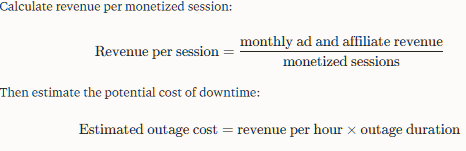
Estimate the direct financial effect with this formula:

For example, if a website earns an average of $0.08 per monetized session and an outage prevents 10,000 sessions from loading, the estimated direct revenue loss is $800. This does not include emergency development work, missed affiliate conversions, or the potential effect on user trust.
A high-traffic blog should monitor uptime, HTTP errors, server response time, database latency, and conversion events. Do not rely solely on an advertised uptime percentage. Review the provider’s service-level agreement, exclusions, backup policy, restoration process, and incident response.
Shared vs. VPS vs. Managed Cloud: What Architecture is Required for 100k Traffic?
The most suitable architecture for a 100k traffic blog depends on traffic peaks, page complexity, cacheability, database workload, technical expertise, and revenue risk.
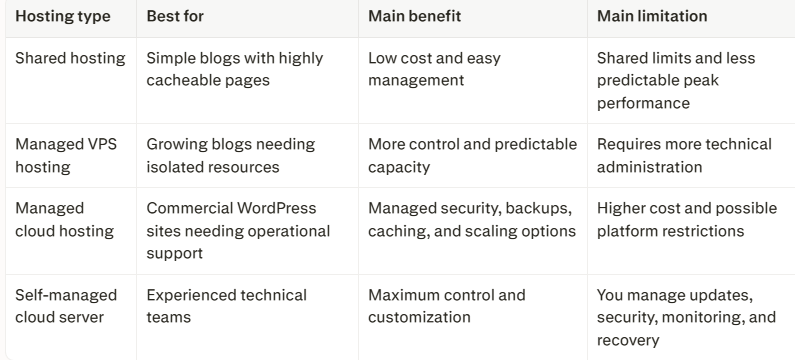
A shared hosting plan may handle 100,000 monthly visitors when the site has a high cache-hit ratio and limited dynamic functionality. A managed VPS or cloud platform becomes more appropriate when uncached requests, database activity, or downtime risk exceeds the shared plan’s limits.
Why Isolated Resources and Dedicated vCPU Cores Matter
Isolated resources reduce competition between your website and other accounts on the same infrastructure.
Dedicated or reserved vCPU capacity can improve predictability when the website must process cache misses, PHP scripts, database queries, image operations, scheduled tasks, comments, search requests, and plugin activity.
However, dedicated CPU does not fix inefficient software. A poorly coded plugin, slow database query, or excessive bot traffic can still consume resources on a VPS or cloud server.
Before upgrading, measure:
– CPU utilization.
– Memory and swap usage.
– PHP worker consumption.
– Database latency.
– Disk I/O wait.
– Peak requests per second.
– HTTP error rates.
– Cache-hit ratio.
– Origin time to first byte.
Load-test representative pages, including cached posts, cache misses, search pages, comment submissions, and WordPress admin requests.
The Role of Server-Level Caching: Redis, Memcached, and Nginx FastCGI
Server-level caching improves performance by reducing the amount of work required to generate repeated responses.
– Redis is commonly used for persistent object caching, sessions, queues, and application data.
– Memcached stores temporary objects and database results in memory.
– Nginx FastCGI cache stores generated responses so repeat requests can bypass PHP and WordPress.
– PHP OPcache stores compiled PHP code to reduce repeated processing.
Redis and Memcached are not replacements for full-page caching. They reduce database and object lookups, while FastCGI or page caching can avoid executing WordPress for eligible public requests.
Ask your hosting provider:
– Is object caching included?
– Which caching system is used?
– How are cached pages purged after publishing?
– Which URLs and cookies bypass the cache?
– Is cache warming available?
– Can the cache be inspected and monitored?
A technology listed on a feature page is not proof that it is enabled or correctly configured.
Bandwidth and Concurrency: How Many Simultaneous Visitors Can Your Server Handle?
Monthly visitors, pageviews, requests, bandwidth, and concurrent connections measure different things.
– Monthly visitors: People or sessions recorded during a month.
– Pageviews: Individual page loads.
– Requests: Calls for HTML, images, scripts, fonts, ads, and APIs.
– Concurrent connections: Requests being processed at the same time.
– Requests per second: The rate at which requests arrive.
– Bandwidth: The volume of data transferred.
One visitor can generate dozens of requests while loading one page. A CDN may serve many of those requests without contacting the origin server.
The average is not sufficient for hosting decisions. Measure your busiest periods and test the server under realistic traffic spikes.
Which Hosting for 100k Traffic Blogs Is Right for You? (The Comparison)
There is no universally best hosting provider for every high-traffic blog. The correct choice depends on whether you prioritize managed operations, customization, enterprise WordPress support, or an all-in-one service.
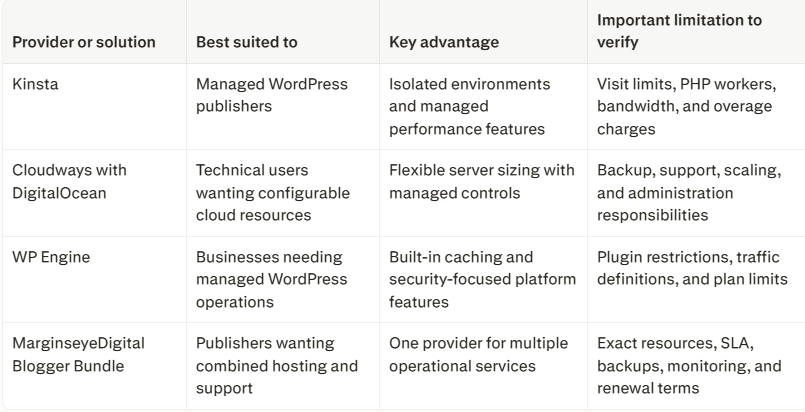
Kinsta is managed WordPress hosting designed for publishers and businesses that want the hosting provider to handle much of the infrastructure maintenance.
Its platform promotes isolated containers, performance-focused WordPress hosting, CDN delivery, security controls, backups, and managed support.
Kinsta may suit a blog where downtime and slow origin responses can directly reduce advertising or affiliate revenue. It is less suitable for users who need unrestricted server access or custom operating-system software.
Before buying, verify the plan’s visit definition, CDN allowance, storage, PHP worker allocation, backup retention, data-center location, overage policy, and plugin compatibility.
Cloudways (DigitalOcean): Best Customizable Solution for Comment-Heavy Blogs
Cloudways is a managed cloud hosting platform that allows customers to deploy applications on supported cloud infrastructure, including DigitalOcean.
This option can suit a comment-heavy or plugin-intensive blog that needs more control over server size and resources than typical shared hosting provides. DigitalOcean’s WordPress offering highlights managed features such as backups, SSL, staging, and support through Cloudways.
The platform requires more technical decision-making than a fully managed WordPress environment. Verify the selected server’s CPU, RAM, storage, bandwidth, backup configuration, Redis or Memcached availability, scaling process, support scope, and total monthly cost.
WP Engine: Best Enterprise WordPress Caching and Built-in Security
WP Engine is managed WordPress hosting that provides a standardized platform for performance, caching, security, staging, and support.
Its documentation describes managed caching and a security environment that includes segregated environments and regular security testing. WP Engine states that its security environment is ISO 27001:2022 certified.
WP Engine may be appropriate for a commercially important WordPress blog that values managed operations over unrestricted server customization.
Check plugin restrictions, pageview definitions, cache-purging behavior, support tier, staging workflow, backup recovery, and the total price at your expected traffic level.
The MarginseyeDigital Blogger Bundle: The Best Value All-in-One Alternative
The MarginseyeDigital Blogger Bundle should be evaluated as an all-in-one hosting and support solution rather than assumed to be the best option solely because it combines multiple services.
An all-in-one bundle can be valuable when it includes hosting, migration assistance, performance configuration, backups, security monitoring, technical support, and related services under one accountable provider.
To assess whether it offers better value, confirm:
– CPU, RAM, storage, and bandwidth allocation.
– Server and data-center location.
– CDN and page-caching configuration.
– Backup frequency and retention.
– Uptime monitoring and incident response.
– Security and malware recovery responsibilities.
– Migration and rollback support.
– Support hours and escalation process.
– Renewal pricing.
– Traffic, storage, and overage limits.
– Availability of object caching and staging.
The bundle may be a practical alternative for bloggers who do not want to coordinate several vendors. It should be compared using verified resources, support terms, benchmarks, and total cost—not the number of features in the package.
The Financial Blueprint: Budgeting for High-Traffic Infrastructure
Hosting for a high-traffic blog should be budgeted according to business risk, not visitor count alone.
A site generating advertising, affiliate, lead-generation, or sponsored-content revenue may justify managed infrastructure if the cost of one significant outage exceeds the additional hosting fee.
Calculating the ROI: How Much Should You Spend to Protect Your Mediavine or Raptive Earnings?
Compare the additional hosting cost with the revenue protected, support time saved, performance improvements achieved, and recovery options provided.
A premium host is worthwhile only when it provides measurable value through fewer failures, faster recovery, more predictable performance, or reduced technical workload.
Understanding Cost Per 1,000 Visitors (CPM Hosting Metrics)
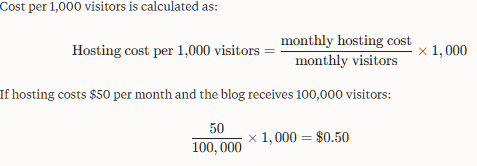
This metric is useful for comparing plans, but it does not measure value by itself. Also compare cost per pageview, cost per monetized session, uptime, support quality, CDN charges, backup protection, and revenue lost during outages.
For an audience in Kenya or elsewhere in Africa, test response times from Nairobi and other priority locations. The advertised data-center region does not always reflect the complete visitor experience.
Conclusion: Making the Leap to Enterprise Performance
A blog does not automatically need enterprise hosting because it has reached 100,000 monthly visitors. It needs infrastructure that matches its peak traffic, cacheability, database workload, monetization risk, and recovery requirements.
Before upgrading your hosting, measure peak requests, cache misses, PHP and database usage, origin response time, HTTP errors, and Core Web Vitals. Then compare shared hosting, managed VPS hosting, managed cloud hosting, and managed WordPress platforms using transparent resource limits and clearly defined support terms.
Shared hosting may still work for a simple blog with highly cached pages and modest traffic spikes. Managed VPS or cloud hosting becomes more suitable when your site needs isolated resources, greater control, or better performance during traffic surges.
The best hosting for a 100k traffic blog is the platform that delivers predictable performance, reliable backups, transparent limits, and a tested recovery process. It is not automatically the most expensive host or the plan with the boldest marketing promise.
Related Articles
- Best Web Hosting Providers →
- Fastest Web Hosting →
- Hosting for 100k Traffic Blogs →
- Hosting for Viral Traffic Spikes →
- Managed Cloud Hosting →
- WordPress Hosting Best Options →
- Hosting Cost vs Downtime Analysis →
- Hosting Uptime Comparison →
- Ecommerce Hosting Solutions →
- Hosting for SaaS Platforms →
- Hosting for Agencies →
- Hosting for Developers →
- Hosting for Startups →
- Enterprise Hosting Solutions →
- Hosting with CDN Comparison →
- Hosting with DDoS Protection →
- Auto Scaling Hosting Providers →
- Low Latency Hosting Options →
- Global Hosting Providers →
- Cloud vs VPS Hosting →
- Managed vs Unmanaged Hosting →
- Hosting Speed Comparison →
- Hosting Performance Benchmarks →
- Hosting for News Websites →
- Hosting for Video Platforms →
- Hosting for API Platforms →
- Hosting Pricing Comparison →
- Cheap vs Premium Hosting →
- Hosting ROI Calculator →
Frequently Asked Questions About High-Traffic Blogs
Can a cheap cloud hosting plan handle 100,000 monthly visits?
Yes, a cheap cloud hosting plan can handle 100,000 monthly visits when most pages are cacheable, the CDN has a high cache-hit ratio, and the origin server receives relatively few dynamic requests.
It may struggle if visitors bypass the cache, bots generate excessive requests, or WordPress must process frequent database queries. Measure peak requests per second, CPU usage, memory, PHP workers, database latency, and HTTP errors before relying on a low-cost plan.
How do I safely migrate my blog to a new host without losing SEO traffic?
To migrate a high-traffic blog safely, preserve the URLs, test the new server before changing DNS, and monitor the site after the migration.
Create a complete backup, record current rankings and organic traffic, test redirects and canonical tags, verify robots.txt and XML sitemaps, check analytics tracking, reduce DNS TTL where practical, and keep the old host available during DNS propagation.
A hosting migration should not change your URLs. If URLs must change, create and test permanent redirects before launch.
What is the difference between monthly pageviews and concurrent server connections?
Monthly pageviews count the number of pages loaded during a month. Concurrent connections measure how many requests the server is handling at the same time.
A blog can receive 100,000 pageviews gradually or receive most of them during a short viral event. The second scenario creates more pressure on CPU, PHP workers, memory, databases, and network connections.
One pageview can also generate multiple requests for HTML, images, scripts, fonts, advertisements, and analytics files.
How much RAM does WordPress need for 100,000 monthly visitors?
There is no universal RAM requirement for 100,000 monthly visitors because caching and application complexity matter more than the visitor count alone.
A simple, well-cached blog may work with less memory than a smaller website using WooCommerce, memberships, comments, search, or complex plugins. The server must have enough RAM for the operating system, web server, PHP workers, database, object cache, and traffic spikes.
Monitor memory usage, swap activity, PHP failures, and database performance before selecting a server size.
Is shared hosting suitable for a blog with 100k monthly visitors?
Shared hosting can be suitable for a simple, highly cached blog, but it provides less predictable performance during traffic spikes because multiple accounts share server resources.
Before staying on shared hosting, check your CPU usage, memory limits, PHP worker allowance, database connections, disk I/O, and throttling history. If the site regularly reaches these limits, move to a managed VPS or managed cloud platform before a major traffic event exposes the problem.
Does a CDN solve high-traffic WordPress hosting problems?
A CDN reduces origin-server load by serving cacheable files and, when correctly configured, selected pages from edge locations. It does not automatically solve database overload, slow plugins, uncached WordPress requests, login traffic, search requests, or personalized content.
A CDN is most effective when combined with full-page caching, optimized images, efficient database queries, bot controls, and adequate origin capacity. Static content is generally easier to cache than dynamic HTML, which requires carefully configured rules and exclusions.
Should I choose VPS hosting or managed WordPress hosting for a high-traffic blog?
Choose VPS hosting when you need more control over server resources, software configuration, caching, or database settings and have the technical skills to manage them.
Choose managed WordPress hosting when you prefer the provider to handle more of the infrastructure, including backups, security, WordPress optimization, caching, staging, and technical support.
A managed VPS can provide a useful middle ground, but confirm exactly which tasks the provider performs and which responsibilities remain yours.
How do I stop database overload on a high-traffic WordPress site?
Reduce database overload by identifying slow queries, removing unnecessary plugins, limiting expensive WordPress features, cleaning spam comments and obsolete data, reviewing autoloaded options, and enabling persistent object caching where appropriate.
You should also protect search, login, comment, and API endpoints from abusive automated requests. For larger sites, monitor slow-query logs, database connections, query latency, and table growth.
Object caching can reduce repeated database lookups, but it does not fix inefficient queries or poorly designed plugins.
How many simultaneous visitors can a WordPress server handle?
There is no fixed number of simultaneous visitors that every WordPress server can handle.
Capacity depends on CPU, RAM, PHP workers, database performance, page complexity, cache-hit ratio, CDN usage, image sizes, plugins, and the number of requests generated by each pageview.
The most reliable way to estimate capacity is to load-test representative cached and uncached pages while monitoring response times, error rates, CPU usage, memory, PHP workers, and database connections.
How often should I load-test a high-traffic blog?
Load-test your website before a major campaign, redesign, hosting migration, advertising push, or expected seasonal traffic increase.
You should also repeat testing after installing resource-intensive plugins, changing caching rules, modifying database queries, or moving to a new server.
Test realistic traffic patterns rather than sending only a smooth stream of requests. Include cache misses, search, comments, login attempts, scheduled tasks, and important landing pages.
How important are backups for a 100k traffic blog?
Backups are essential because high traffic increases the financial and operational cost of data loss or prolonged downtime.
A suitable backup system should include automated backups, off-server storage, retention rules, database and file recovery, and a documented restore process. Test restoration regularly because a backup that has never been restored is not fully verified.
For a revenue-generating blog, consider whether the host provides point-in-time recovery, staging restores, and a rollback option after failed updates.
Can high-traffic hosting improve Google rankings?
High-traffic hosting can improve reliability and user experience, but hosting alone does not guarantee higher Google rankings.
A stronger hosting environment may reduce server errors, improve response times, support better Core Web Vitals, and keep important pages available to users and crawlers. Rankings still depend on content quality, relevance, technical accessibility, links, user experience, and many other factors.
Treat hosting as a performance and availability foundation—not as a replacement for SEO strategy.
Do I need Redis, Memcached, or server-level caching for 100k visits?
Not every blog needs all three technologies. A simple site with effective full-page caching may receive little benefit from a complex object-caching setup.
Redis or Memcached can reduce repeated database lookups, while server-level page caching can serve eligible responses without executing WordPress. The right option depends on the site’s cache misses, database workload, plugins, and dynamic features.
Ask the host how each cache works, which requests bypass it, how it is purged, and whether it is actively monitored before treating the feature as a performance advantage.