AI-first content creation meets enterprise-level governance and activation Adobe GenStudio blends the best of generative creativity and performance marketing muscle. Adobe GenStudio’s generative AI isn’t just for show it enables marketers to spin up campaign-ready assets in minutes, including optimized images, copy, and video briefs.
With built-in brand safety, marketing teams can accelerate creative output without sacrificing brand standards or compliance. Imagine launching personalized display ads, email series, and social campaigns tailored to multiple audiences all from a single AI-driven interface.
By the end of this article, you’ll know exactly how to use GenStudio to build campaigns that perform while staying on-brand.
What Is Adobe GenStudio?
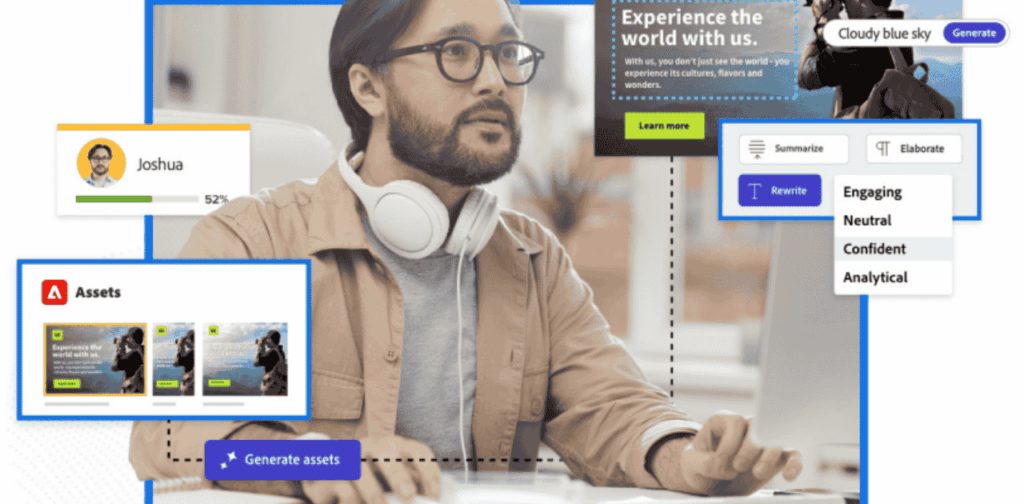
Adobe GenStudio is a generative AI-powered creative-to-campaign platform that integrates with Adobe Firefly, AEM, Workfront, and major ad activation channels. It helps marketers:
- Generate multiple creative variants (copy + visuals + motion)
- Enforce brand guidelines across campaigns
- Automatically scale and activate across Meta, Google, TikTok, display, and email
- Iterate creative based on performance feedback from channel data
E.g., Firefly’s image generation + LLM copywriter + asset approvals + channel activation = full 360° campaign workflow.
Why it matters for performance marketers:
- Speed: Launch A/B test creative variants in hours, not weeks.
- Scale: Personalize campaigns across segments and personas.
- Safety: Brand compliance baked into every step.
- Integration: Seamless flow—brief → generate → approve → publish → optimize.
Who Should Use Adobe GenStudio?
- Performance Marketers & Media Buyers
- Want fast campaign cycle time, dynamic ad testing, and creative iteration based on performance metrics.
2. Creative Teams & Non-Designer Marketers
- Empowered to create on-brand visuals without endless back-and-forth with graphic designers.
3. Agencies & In-House Marketing Teams
- Need to scale content across multiple clients or product lines, each with unique brand standards.
4. Enterprise Marketing Leads
- Seek tools with governance and compliance baked in—without slowing down the creative engine.
5.Persona Snapshot (Optional visual):
- Name/Role
- Objective (“Launch personalized carousel ads in two weeks”)
- GenStudio Benefit (e.g., “Generates 5 ad variants per persona with built-in brand checks”).Check out what large companies like Lenovo use Adobe GenStudio
4. How To Use Adobe GenStudio: Step-by-Step Workflow
Let’s walk through how a performance marketer would use Adobe GenStudio from idea to live campaign.
Step 1: Create a Campaign Brief
- Use Workfront (integrated inside GenStudio) to outline campaign goals, audiences, KPIs, and brand tone.
- Assign collaborators and get approvals in one place.
Check out the Workfront-GenStudio integration] to see how performance marketing easily connects to Adobe and third-party applications to support end-to-end content workflows
Step 2: Generate Creative Variants
- Launch Firefly to create images or background visuals using text prompts.
- Let GenStudio’s AI generate suggested ad copy, email subject lines, CTAs, etc.
- Choose from multiple copy/image variants matched to your brand guidelines.
Check out how to use prompts to create amazing images with this Adobe Firefly prompt .
Step 3: Approve & Align
- Route creatives through automated brand safety checks.
- Share with team leads for quick approval.
- Optional: enforce region-specific compliance using templates.
Check out the brand safety/approval flow of Genstudio
Step 4: Publish Across Channels
- Push directly to platforms like Google Ads, Meta, TikTok, or Adobe Campaign.
- GenStudio adapts creative formats (carousel, video, static, email) automatically.
Step 5: Optimize Based on Performance
- Get real-time performance insights.
- Use GenStudio’s feedback loop to refine underperforming assets with new variants.
Check out the following to learn how to use GenStudio for Performance Marketing to create on-brand experiences performance optimization documentation]
Result: Campaigns go from concept → live test → optimized variation within 48 hours. No bottlenecks, no chaos.
5. Real Use Cases: How Top Brands Use GenStudio for Performance Marketing
Let’s zoom into some use cases from real-world teams:
Ecommerce Brand (Retail)
- Challenge: Needed 100+ ad variations for their mid-year sale.
- Solution: Used GenStudio to auto-generate product-based ad creatives for Google and Facebook.
- Result: 37% lift in CTR, 24% reduction in creative production time.
Check out this link to real world insights from brands using GenStudio, “Retail brands use GenStudio”]
Travel Startup
- Challenge: Customizing email offers per region, per persona.
- Solution: GenStudio + Adobe Campaign to generate localized headlines and imagery for each destination.
- Result: 19% increase in open rates, 31% higher conversion rates.
B2B SaaS Company
- Challenge: Brand compliance across 5 regions and 3 languages.
- Solution: Used GenStudio’s brand governance model to standardize visuals, copy tone, and CTAs.
- Result: Saved 62 hours/month on compliance workflows.
6. Built-in Brand Safety & Cross-Platform Integration
Adobe GenStudio doesn’t just create it governs.
Brand Safety
- Uses AI to flag off-brand language, tone, or visuals
- Restricts use of certain colors, fonts, or messaging per region or client
- Audit trails show who approved what—perfect for regulated industries
Integrations That Matter
- Creative Tools: Adobe Firefly, Photoshop, Illustrator
- Project Management: Adobe Workfront
- Publishing Channels: Meta, Google, TikTok, YouTube, Email platforms
- DAMs & CMS: Adobe Experience Manager (AEM) for large-scale digital asset management
Everything from concept to campaign launch is covered in one ecosystem.
7. The Real Tea: Pros, Cons, and Rookie Mistakes with Adobe GenStudio
Alright, so you’ve seen the flashy features and the sexy use cases. But before you go shouting “TAKE MY MONEY!” at Adobe, let’s get real. What actually slaps… and what might smack you in the face if you’re not careful?
The Good Stuff (Yes, it’s that good)
Let’s start with the gold. Adobe GenStudio isn’t just another “AI marketing tool.” It’s a full-blown creative command center for performance marketers who are tired of chasing designers, waiting on approvals, and fighting with four tools that don’t talk to each other.
The biggest win? Speed. You’re not waiting 3 days to test a headline tweak. With GenStudio, you punch in your campaign brief, the AI drafts five versions, and boom you’re live before lunch. That’s not just fast. That’s agile marketer nirvana.
Then there’s the brand safety magic. Imagine uploading your brand style guide and never having to worry again about off-tone copy or rogue fonts sneaking into your ads. GenStudio keeps everything locked to your standards—even across teams and time zones.
And yeah, it’s channel-flexible. Whether you’re running lead gen on LinkedIn, reels on TikTok, or email blasts in Adobe Campaign, GenStudio shapes your content to fit every platform without needing five different designers.
Basically, it makes your chaotic marketing stack feel like a synced-up band on tour.
The Not-So-Fun Bits (You should know before diving in)
Let’s not pretend GenStudio is a magical unicorn. It’s powerful, but it comes with its quirks.
First off, it’s not plug-and-play. This isn’t Canva for beginners. There’s a learning curve, especially if you’re new to Adobe’s ecosystem. You’ll need a bit of patience and probably a few YouTube tutorials before everything clicks.
Second, you can’t really use it in isolation. GenStudio shines brightest when it’s paired with Adobe Workfront, Firefly, and AEM. So if your team is already deep in the Adobe suite, amazing. If not, expect some setup (and subscription) hurdles.
And here’s the sneaky one: the AI doesn’t always nail it on the first try. It’ll give you copy, visuals, and ideas but you still need human touch. If you just copy-paste whatever the AI spits out, don’t expect results. It’s a partner, not a replacement.
Rookie Mistakes to Avoid (Please don’t be that marketer)
Here’s where good campaigns go to die so let’s dodge the landmines:
- Skipping the strategy step. Don’t just hop in and start generating content. Set a solid brief. Know your audience, KPIs, and brand tone before you touch that keyboard.
- Letting AI write unchecked. Sure, the AI writes fast—but it doesn’t understand context like you do. Tweak, polish, humanize. Always.
- Ignoring platform differences. What slaps on TikTok might flop in email. GenStudio helps adapt content, but you still need to think like a performance marketer, not a factory machine.
- Forgetting to test. The power of GenStudio isn’t in creating one perfect ad. It’s in spinning up variations, running tests, and quickly optimizing. Use it like a lab—not a megaphone.
Why Adobe GenStudio Deserves a Spot in Your Stack
Let’s be honest. Performance marketing in 2025 isn’t about who can write the snappiest headline or who has the fanciest visuals—it’s about who can test, adapt, and launch at scale without burning out the team or breaking the brand.
That’s exactly what Adobe GenStudio was built for.
- If you’re tired of juggling five platforms just to launch one campaign…
- If you’ve ever sent 17 Slack messages for a single asset approval…
- If your A/B test backlog is growing faster than your leads…
GenStudio is the growth engine your team didn’t know it needed.
From idea to execution, it’s like plugging your marketing team into a generator that never runs out of creative juice. Whether you’re a performance pro, a creative lead, or running lean with a two-person team—this tool turns chaos into campaigns.
Ready to Try Adobe GenStudio?
If you’re serious about leveling up your creative game, this is your move:
Explore Adobe GenStudio Features
Watch How It Works (Video Demo)
Get Started With Adobe (Free Trial or Request Demo)
And if you’re still unsure whether it’s right for your workflow?
Save this guide. Share it with your team. Or shoot us a message—because we’re building smarter, faster marketing every damn day.
PS: Want more AI-powered tools, workflow breakdowns, and marketer playbooks? Sign up for the MarginsEye newsletter—where we turn tools into tactics, and tech into ROI. Do you want to read more on AI marketing and sales AI tools, time to do just follow the link.
[mailerlite_form form_id=4]
FAQs
Is Adobe GenStudio the same as Firefly or Sensei?
Nope—and this confuses a lot of people.
Firefly is Adobe’s generative AI engine (the brain behind the visuals), and Sensei is the older AI framework powering analytics and personalization.
GenStudio is the all-in-one hub that brings all these AI tools together. It’s like the studio where Firefly paints, Sensei predicts, and you—the marketer—run the show.
Is Adobe GenStudio better than Canva or ChatGPT for marketers?
It depends on your goals.
If you’re a solopreneur trying to whip up a promo flyer, Canva’s great.
If you want copy fast and don’t mind tweaking, ChatGPT’s a beast.
But if you’re running multi-channel campaigns at scale with strict brand rules, approval workflows, content reuse, and personalization—GenStudio wins. Every. Time.
Related: How Adobe GenStudio integrates across marketing workflows
How does GenStudio help with actual performance marketing goals—like CTRs or conversions?
It’s not just a pretty design tool. GenStudio lets you:
- Rapidly A/B test variations
- Personalize creative to different audience segments
- Push assets live across platforms instantly
- Track content performance across the entire funnel
The result? You spend more time optimizing and less time waiting on creatives.
Is it overkill for small marketing teams?
Not necessarily.
If you’re a one-person army doing social, email, ads, and landing pages—GenStudio might actually save you. But you’ll need a bit of upfront setup and maybe some Adobe ecosystem tools to unlock its full value.
It’s more of a scale tool than a casual design app. Think: team-ready rather than freelancer-friendly (for now).